

Content
Perk Tree
Unlock connected perks, build an active loadout, and use Prestige points to increase your Perk Tree capacity.
Content
Unlock connected perks, build an active loadout, and use Prestige points to increase your Perk Tree capacity.
Click the Perk Tree orb beside the minimap. Choose Archery, Wizardry, Melee, Utility, Donator or Loyalty. Search by a perk name or effect, then select a node to read its effect, requirements and unlock cost. Drag to move the tree and scroll to zoom.
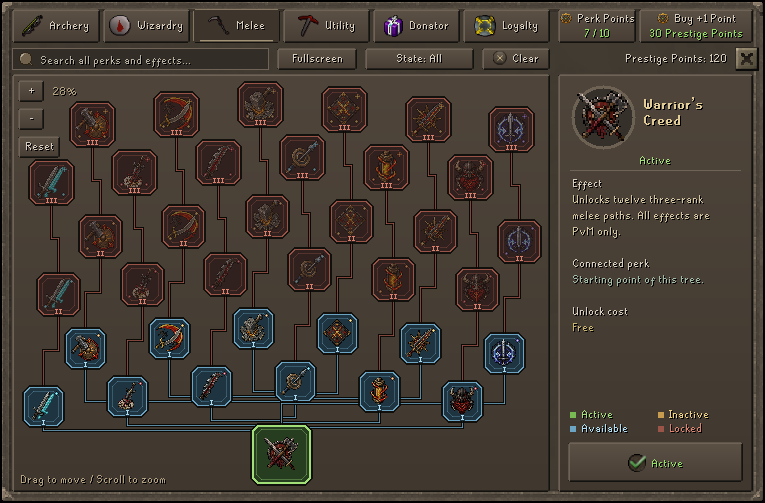
The root is always active. Owning a high-rank perk does not make it effective while its required active path is switched off. Combat trees describe their PvM effects; do not assume those effects apply to player combat.
Accounts start with 10 Perk Tree points. Buy +1 Point costs 30 Prestige points. A Perk point scroll grants one additional point when claimed. Active Loyalty Membership adds temporary capacity: +1 at level 1, +2 at level 2 and +4 at level 3.
Read Prestige before resetting a skill and Loyalty Membership before redeeming a bond.
| Tree | What to check |
|---|---|
| Archery | Ranged weapon and ammunition requirements, active rank, and any activation condition. |
| Wizardry | Required spell, spellbook or weapon; some effects work only with a particular spell family. |
| Melee | Weapon style, special-attack requirements, and any damage or defence trade-off. |
| Utility | The exact skill, tool and activity supported by the perk. |
| Donator | Benefits granted automatically by your current donor rank. |
| Loyalty | Benefits granted automatically while your required membership level is active. |
Change active perks while safe and idle. Changes are blocked in the Wilderness, during combat or skilling, while dead, and during a player session such as trading. Donator and Loyalty perks are automatic benefits; they cannot be toggled like purchased combat or Utility perks.
For task unlocks, use the Adventure Guide. Old sigil and pet-tier guides do not describe the current Perk Tree.